Why Choose a Laptop Side Table for Work and Study?

Time:2026-09-25 Author:Madeline
0%

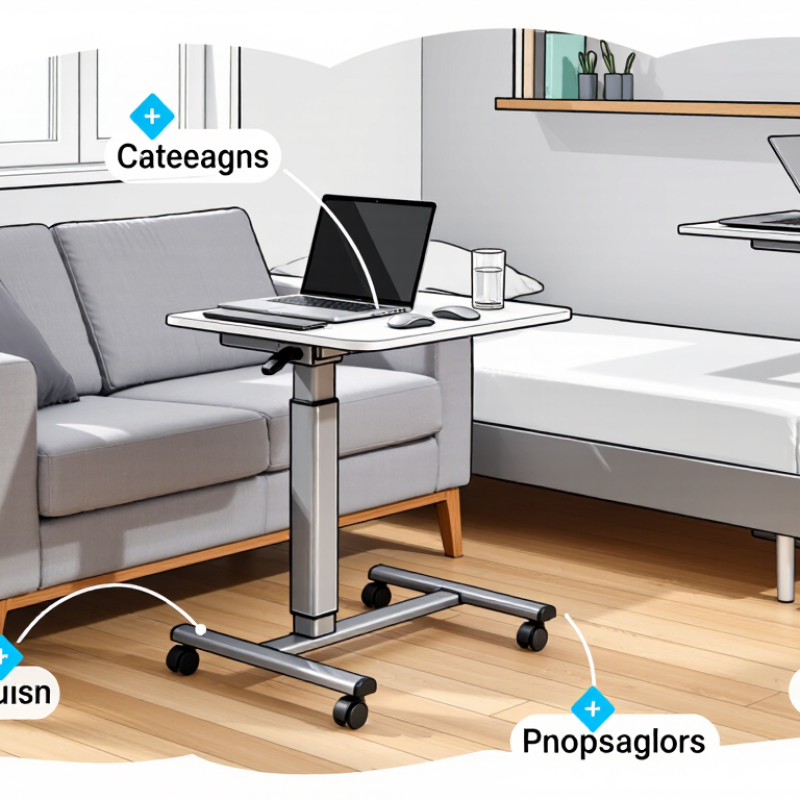
A Laptop Side Table can turn a narrow room, sofa corner, or bedside space into a practical workstation. This matters as work and study increasingly move beyond traditional offices. Gallup’s 2024 workplace data reports that 53% of U.S. employees with remote-capable jobs follow a hybrid schedule. Many people now need flexible surfaces that support short work sessions without occupying an entire room.

The value is practical, not decorative. A well-designed Laptop Side Table places the computer closer to eye level and keeps notebooks, a mouse, and a drink within reach. Its adjustable height can reduce awkward bending, especially when the user changes from sitting on a sofa to standing briefly. OSHA’s Computer Workstations eTool recommends a stable work surface, neutral wrist positions, and a monitor placed directly in front of the user. A side table can support these principles when paired with an external keyboard, mouse, or laptop stand.

Small details matter. A broad base prevents wobbling. Rounded edges protect knees. Lockable wheels can help, but only on suitable flooring. It is not a miracle cure. A table that is too low may encourage rounded shoulders, while excessive storage can create clutter. Personal experience also exposes a weakness: convenience often makes users work longer than planned. Therefore, this article examines how to choose a Laptop Side Table for comfort, mobility, and realistic daily use. The best option should fit the room, the device, and the user’s habits—not merely look compact in a product photograph.
Why Choose a Laptop Side Table for Work and Study?

Laptop Side Tables Explained: Definition, Scope, and Typical Users

A laptop side table is a compact surface placed beside a sofa, bed, or reading chair. Unlike a lap desk, it rests on the floor and may have adjustable height or a base that slides under furniture. Its scope is practical: hold a laptop, notes, and a drink within reach, without taking up a full desk’s footprint. Small details matter. A stable base and enough room for a mouse can make short tasks easier. But a narrow top may feel cramped during longer sessions.

Typical users include students reviewing notes beside a bed, remote workers moving between rooms, and readers handling email from an armchair.

The U.S. Bureau of Labor Statistics reported that 35% of employed people did some or all of their work at home on days they worked in 2023, in its American Time Use Survey. That makes flexible work surfaces relevant, though it does not show how many people use side tables.

For regular typing, OSHA’s computer-workstation guidance recommends positioning equipment to support a comfortable posture; a side table may not provide that adjustment. A useful stopgap. Not a perfect workstation. Check that the screen is near eye level and your shoulders stay relaxed—easy to overlook when the table looks convenient.

Ergonomic Setup: Applying OSHA and Cornell Workstation Benchmarks

A laptop side table can support a healthier setup, but only when its height suits your body. OSHA’s Computer Workstations eTool recommends keeping the monitor in front of you, shoulders relaxed, elbows near your sides, and wrists straight. Cornell ergonomics guidance also advises placing the screen roughly 18–30 inches from your eyes, with its top at or slightly below eye level. Small changes matter.

A separate keyboard and mouse help meet those benchmarks because a laptop’s attached keyboard often forces the screen too low. Raise the laptop on a stable stand, then place the keyboard where your forearms stay level and your feet rest firmly on the floor. No awkward reaching. The U.S. Bureau of Labor Statistics reported 272,780 musculoskeletal-disorder cases involving days away from work in 2018, about 30% of such cases. That figure covers many occupations, not laptop users alone, but it shows why repetitive strain deserves attention. Measure your setup rather than assuming a side table is ergonomic; some are simply too high or too narrow. Mine would need a lower keyboard position. A useful setup is adjustable, stable, and comfortable through a real study session.

Why Choose a Laptop Side Table for Work and Study?

Ergonomic Setup: OSHA and Cornell Viewing-Distance Benchmarks

A side table can help position a laptop screen at a comfortable viewing distance while leaving room to arrange a separate keyboard and mouse. The ranges overlap at 20–30 inches; adjust the setup to your posture and visual comfort, and keep the top of the screen at or slightly below eye level.

Sources: OSHA Computer Workstations and Cornell Ergonomics guidance.

Hybrid Work Demand: BLS 2023 Data on Remote Work and Flexible Spaces

The U.S. Bureau of Labor Statistics reported that 35% of employed people did some or all of their work at home on days they worked in 2023. That was up from 24% in 2019, according to its American Time Use Survey. The figure measures work location, not how often people switch between home and an office. Still, it shows why a fixed desk may not suit every workday.

Gallup’s 2023 research found that 52% of U.S. employees whose jobs could be done remotely worked in a hybrid arrangement. Flexible work often means changing rooms, schedules, or tasks. A laptop side table can make those transitions easier: roll it beside a sofa for a video call, then move it near a chair for reading. Keep the surface large enough for a laptop, a notebook, and a glass of water. Small details matter.

Not every day. A side table is not a full ergonomic workstation, and cramped surfaces can encourage awkward posture. Check its height against your chair, and leave enough room for your knees. The data supports flexibility, but it does not prove that one furniture choice improves productivity. A practical setup is one you can adjust without turning every room into an office.

Study-Space Efficiency: NIOSH Guidance on Sedentary Workstations

A laptop side table can make a small study corner more flexible, but its height and stability matter. NIOSH guidance on sedentary work emphasizes reducing prolonged, fixed postures and arranging work to support comfortable movement. A side table helps only when it places the screen near eye level and keeps your shoulders relaxed. For longer sessions, pair the laptop with a separate keyboard and mouse when possible. This lets your hands rest lower while the screen stays raised.

Small changes matter. Move the table close enough to avoid leaning forward, and keep frequently used items within easy reach. Stand or walk briefly when your work allows; changing position can be more useful than holding one “perfect” posture all day. A side table is not automatically ergonomic, and a wobbly surface can create new problems. It is easy to overlook that.

Tips: Check that the table does not block your legs. Raise the laptop with a firm stand or a few stable books, then use an external keyboard. Take short movement breaks between tasks. If the setup still leaves your neck strained, adjust it again—comfort can take a little trial and error.

Selection Criteria: Height, Load, Surface Area, and Stability Standards

Why Choose a Laptop Side Table for Work and Study?

A side table works best when its height matches your seated posture. While sitting naturally, your forearms should rest near level with the tabletop, without raised shoulders or bent wrists. Measure from the floor to your elbow, then compare that figure with the table’s height range. A few centimeters can make a noticeable difference. It is easy to overlook this check when shopping by appearance alone.

Check the stated load capacity against everything you plan to place on the table: laptop, books, mug, and perhaps a small lamp. Leave some margin rather than treating the maximum rating as a target. A laptop needs room for its base and ventilation, while comfortable mouse use requires extra surface area. A compact top may fit beside a sofa but feel cramped during longer study sessions. Small details matter.

Stability deserves a hands-on check when possible. Press gently on each corner and watch for rocking, flexing, or a sliding base. Lockable wheels can help with repositioning, but they should hold firmly during use. On uneven floors, adjustable feet may reduce wobble; carpet can hide movement until you start typing. I would also check for rounded edges and a finish that wipes clean. One measurement rarely tells the whole story, so compare the table with your actual chair and room setup.

FAQS

What is a laptop side table?

It is a compact, floor-standing surface placed beside a sofa, bed, or chair. It holds a laptop, notes, and a drink without needing a full desk.

How is it different from a lap desk?

A side table rests on the floor. Some models adjust in height or slide beneath furniture, while a lap desk rests on your legs.

Who might find one useful?

Students can review notes beside a bed, and remote workers can move between rooms. Readers may use one for email from an armchair.

Can it replace a regular desk?

It can work for short tasks, but a narrow top may feel cramped during longer sessions. A useful stopgap. Not a perfect workstation.

What should I check before using one?

Check that the base feels stable and the top has room for your laptop and mouse. A crowded surface can make small movements awkward.

How should I position the screen?

Keep it in front of you, about 18–30 inches from your eyes. Its top should be at or slightly below eye level.

Can I type comfortably on a laptop side table?

A separate keyboard and mouse can help. Raise the laptop on a stable stand, then keep your wrists straight and elbows near your sides.

Does a side table guarantee good posture?

No. Keep your shoulders relaxed and feet supported, and check whether the table height suits you. It is easy to overlook this. I might still need a lower keyboard position.

Conclusion

A Laptop Side Table is a practical solution for people who work, study, or participate in flexible activities from different locations. Its compact design provides a dedicated surface for a laptop, notebook, or other essential items without requiring a full-sized desk. By supporting better screen height, comfortable arm positioning, and sufficient legroom, it can contribute to a more ergonomic workstation when arranged according to general OSHA and Cornell workstation principles.

The growing popularity of remote and hybrid work, reflected in recent BLS data, has increased demand for adaptable furniture that fits bedrooms, living areas, and shared spaces. For students and home workers, a well-designed side table can also help organize limited study areas and reduce prolonged awkward postures, consistent with NIOSH guidance on sedentary work. When choosing one, consider adjustable height, appropriate load capacity, adequate surface area, and strong stability to ensure safe, comfortable, and efficient daily use.


Madeline

Madeline

Madeline is a dedicated marketing professional with a wealth of expertise in our company's core offerings. With a keen understanding of the industry, she brings a unique perspective to her role, consistently delivering high-quality content that highlights the superior aspects of our products. As......